
Choosing a Tactile Sensor in Robotics: How to Evaluate Performance
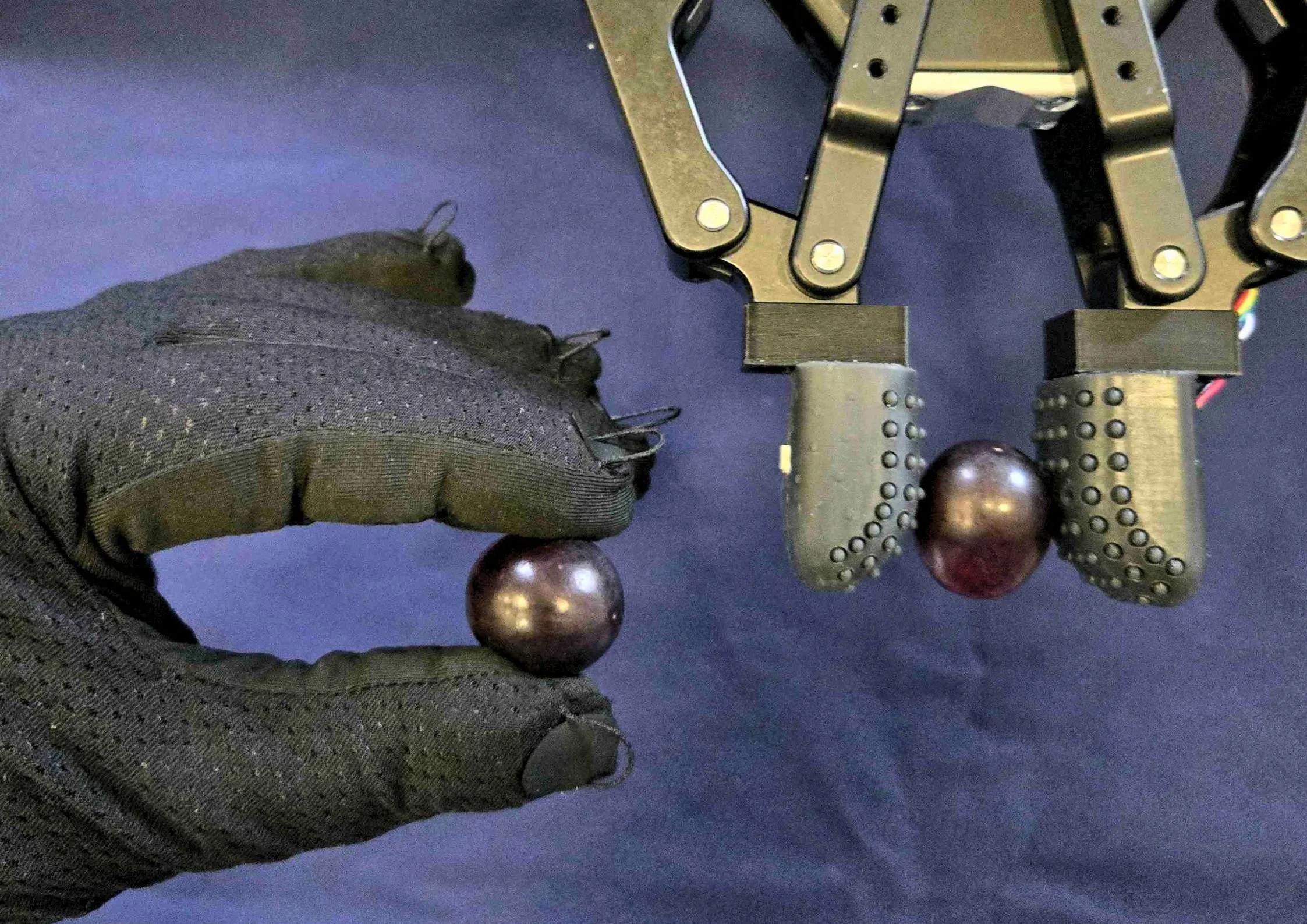
New tactile sensors for robot hands, grippers and data collection gloves now appear every few months. Robotic tactile sensing has moved from the research lab into humanoid and industrial robotics programs, and each new sensor arrives with a datasheet. The problem is that those datasheets rarely use the same terms. Researchers at Imperial College London, who developed an evaluation framework for vision-based tactile sensors with King’s College London and Queen Mary University of London, found that the field still lacks standardized metrics for comparing their performance.
At IROS 2026 in Pittsburgh, one question came up again and again in conversations with robotics engineers: how do you tell which tactile sensors are better than others? We asked Dr. Jae, founder and CEO of PPS, to answer it.
His answer divides the specifications into two groups.
"Resolution and pressure range can be designed around your application. Repeatability and dynamic range show whether the data can be trusted."
The first group describes what the sensor should be. The second describes whether it works.
Spatial resolution: match it to the task
The number of sensing elements is the easiest specification to compare, and it is usually the first one people ask about. Camera-based tactile sensors have become popular because they turn contact into a high-resolution image, borrowing methods from vision to capture texture and shape at the surface.
"Unless you're trying to detect texture or very small features using touch, all that data is not that useful for general manipulation. Even one tactile sensor on the fingertip can be very useful."
A 2026 benchmarking study from UC San Diego, Carnegie Mellon University and Seoul National University tested visual, magnetic, acoustic and resistive tactile sensor technology on pick-and-place, object reorientation and plug insertion tasks. It found that the value of tactile data depends strongly on the type of sensor, the material properties of its contact surface, and the specific task.
Human skin offers a useful reference point. According to a review of tactile sensors from the University of Sheffield, its spatial resolution ranges from about 1 mm at the fingertips to about 5 mm across the palm. A gripper handling boxes does not need fingertip-level detail across its whole surface. Robot hands that must detect slip on a small object, such as a screw on a smooth surface, may need that detail in a few specific places. The sensor's size and the space available on the finger often decide the layout as much as the resolution does.
Each sensing technology has strengths and trade-offs. Vision-based sensors capture fine texture and contact geometry, but they are bulkier and produce large volumes of data. Magnetic sensors can measure shear directly, but nearby magnetic fields can affect them. Capacitive sensors offer thin, flexible arrays with stable, repeatable output, but they need careful shielding against electrical interference. The right choice depends on which of these properties your task needs most.
Pressure range: set it by the force
Pressure range follows the same logic. An industrial humanoid designed for heavy lifting needs a much higher range than robots designed to pick up fragile objects or carry out light-force tasks.
A sensor with too low a range saturates during the task. A sensor with too high a range is less sensitive to the fine contact detail that light-touch work depends on. The right range comes from the forces your robot will actually meet. Some advanced sensors also measure force in three directions, separating normal load from shear, which helps with slip detection. Whether you need that capability is again a question for the application.
Temporal resolution: fast enough to react
Spatial resolution tells us where contact occurs. Temporal resolution, or sampling rate, determines how often a sensor measures changes in contact force. System latency is different: it describes the delay between a physical event and the robot’s response to it.
In our experience, a tactile sampling rate of 100 Hz is a sensible target for general-purpose robotic manipulation, providing a new measurement every 10 milliseconds. Rates of 200 Hz may benefit applications that require rapid slip or impact detection. A high sampling rate does not guarantee low latency, which also depends on sensor processing, communication and control.
Some advanced robot learning systems update their tactile response at considerably lower rates. The proposed method in the T-Rex paper from UC Berkeley and NVIDIA uses a slow planning stage driven by vision at around 5 Hz, and a separate tactile stage that refines its actions at around 20 Hz.
Effective manipulation is therefore possible at modest update rates, but faster sampling captures transient contact events that slower systems miss.
Repeatability: the property that decides data quality
Once spatial resolution, sampling rate and pressure range are set for the application, repeatability is one of the most important properties to check, because reliable performance depends on it.
"If you don't have repeatable sensor behavior, then you're introducing erroneous data or variability that you don't want."
This matters even more when tactile data is used to train manipulation policies, whether in simulation or on real robots. A model cannot distinguish a real change in contact from a sensor that reads differently each time it is pressed. Variability in the sensor becomes variability in the training data, and the same is true for grip controllers that rely on tactile feedback in real time.
Measuring repeatability with accuracy requires precision test equipment, which is difficult to bring to a demo. The most useful evidence is calibration verification data for every element: after calibration, each element is tested again across the full-scale range, and the results are plotted together. If the elements behave consistently, their responses overlap closely.
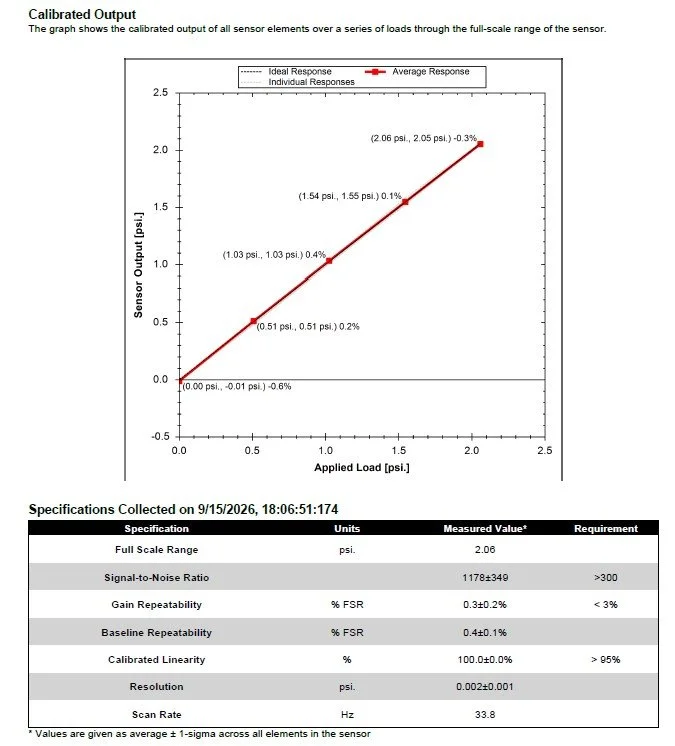
Calibration verification data from a PPS TactArray sensor. Each sensing element’s calibrated output is plotted across the full-scale range, and the responses overlap so closely that they appear as a single line.
"While it may look like one line, it has over 400 elements. All these elements are behaving so similarly it shows as if it’s one line."
How to spot software masking
There is a simpler check you can carry out yourself: baseline repeatability. When you press the sensor and release it, does the signal return to zero?
Many sensors appear to pass this test, but the result can depend on how the software handles low-force signals. Dr. Jae has seen this in practice:
"What companies do when their sensor is not very repeatable is to not show the data unless it reaches a certain force level."
A threshold like this suppresses noise, but it also hides how the sensor behaves at low forces. To check, press the sensor gently and slowly with a fingertip or a probe. The signal should start rising as soon as contact is detected. If nothing appears and the reading then jumps, a threshold is masking the low-force response.
Dynamic range: a sensor, not a switch
The final property is dynamic range. It covers the signal-to-noise ratio, the smallest force the sensor can detect, and the largest force it can measure.
Human touch sets a high bar. Researchers at the Italian Institute of Technology and the University of Genoa used it as the benchmark for robotic tactile sensor design in a review for IEEE Transactions on Robotics, and it remains the reference point today. We can sense very small forces and vibration, and still handle heavy loads with the same hands. Shadow Robot, which builds dexterous robot hands, describes the requirement as handling force variations of around a thousand to one, from light touch to maximum grip. Design guidelines based on human skin, summarized in the same Sheffield review, also call for a response that is stable, repeatable and monotonic, meaning the output always increases as force increases.
"Pressing harder should give you a continuously increasing signal. If it bottoms out, then the sensor is more like an on/off switch rather than being a proper tactile sensor."
What to check when you evaluate a tactile sensor in robotics
You do not need a test lab to learn a great deal about a robotic tactile sensor. During a demo or evaluation, work through the following steps.
Ask for calibration verification data for every element, not only an average across the array.
Press slowly from zero contact. The signal should rise immediately, with no sudden jump at a threshold.
Release the sensor and check that the reading returns to its baseline.
Press with the same force several times and compare the measurements.
Increase the force steadily. The signal should keep rising up to the stated maximum without flattening early.
Ask how the sensor performs as temperature changes, since many robots work outside a controlled lab.
Ask how the resolution, sampling rate and pressure range would be adapted to your robot and your task.
Ask for the sampling rate and the end-to-end latency as separate figures.
Purchase price is only one part of the cost of a tactile sensor. The full cost also includes the engineering time spent integrating it, filtering or correcting its data, and recalibrating it during a project. A sensor that performs well on the checks above usually needs less of that work later, and that is where its real cost effectiveness lies.
Working with PPS
PPS designs and manufactures capacitive tactile sensors for robotics, research and industry, including consumer electronics and automotive applications. If you are new to the technology, Capacitive Tactile Sensing 101 explains how it works and where its strengths lie, and our tactile sensing overview covers the wider range of sensors and applications.
Every project starts with the engineering problem, not the product catalog. Our engineering team can help you work out the resolution, sampling rate and pressure range your application needs, and take you through the repeatability and dynamic range checks described above on our own sensors. Every PPS system is calibrated element by element, and the calibration verification data ships with it.
For tactile sensing on a gripper or robot hand, RoboTact is our touch sensor for robot fingertips.
Frequently asked questions
How do you evaluate a tactile sensor in robotics? Start by defining the resolution, sampling rate and pressure range your task needs. Then check whether the data can be trusted: repeatability, meaning the same contact gives the same reading, and dynamic range, meaning the signal rises continuously from the lightest detectable touch to the maximum force.
What matters most in robotic tactile sensing? Resolution and pressure range should be chosen for the application. Beyond those, repeatability is one of the most important properties, because a robotic tactile sensor that responds differently to the same contact produces unreliable data.
Why is it difficult to compare tactile sensors in robotics? Suppliers describe their sensors in different terms, and there is still no agreed standard for measuring tactile sensing performance. Comparing repeatability and dynamic range directly, using the checks above, gives a fairer picture than comparing datasheets.
Is higher resolution always better for robot manipulation? No. High resolution helps when detecting texture or very small features. For general grasping and manipulation, a small number of well-placed, repeatable sensing elements can be more useful than a dense array.
How can I check tactile sensor repeatability without lab equipment? Press the sensor slowly from zero and release it. The signal should rise immediately and return to its baseline. Repeat the same press several times and compare the readings. Also ask the supplier for calibration verification data for every element.
What does dynamic range mean for a tactile sensor? Dynamic range describes the smallest force a sensor can detect and the largest it can measure, relative to its noise. A sensor with good dynamic range gives a continuously increasing signal as force increases, rather than saturating early.
Why does repeatability matter for tactile data used in robot learning? A manipulation policy learns from the tactile data it is given. If the sensor responds differently to the same contact, the model receives variability that has nothing to do with the task, which makes training less reliable.
What sampling rate does a robotic tactile sensor need? PPS recommends around 100 Hz for general manipulation, which gives a new measurement every 10 milliseconds. Tasks that depend on fast slip or impact detection may benefit from 200 Hz. Sampling rate is not the same as latency, which also depends on processing, communication and control, so ask for both figures separately.